
Wedoany.com Report on Feb 14th, Microsoft Edge recently introduced a new feature through its Copilot AI functionality that can analyze all open tabs simultaneously. This enhancement allows users to have the AI summarize information from all open tabs at once after opening multiple webpages, thereby improving research efficiency.
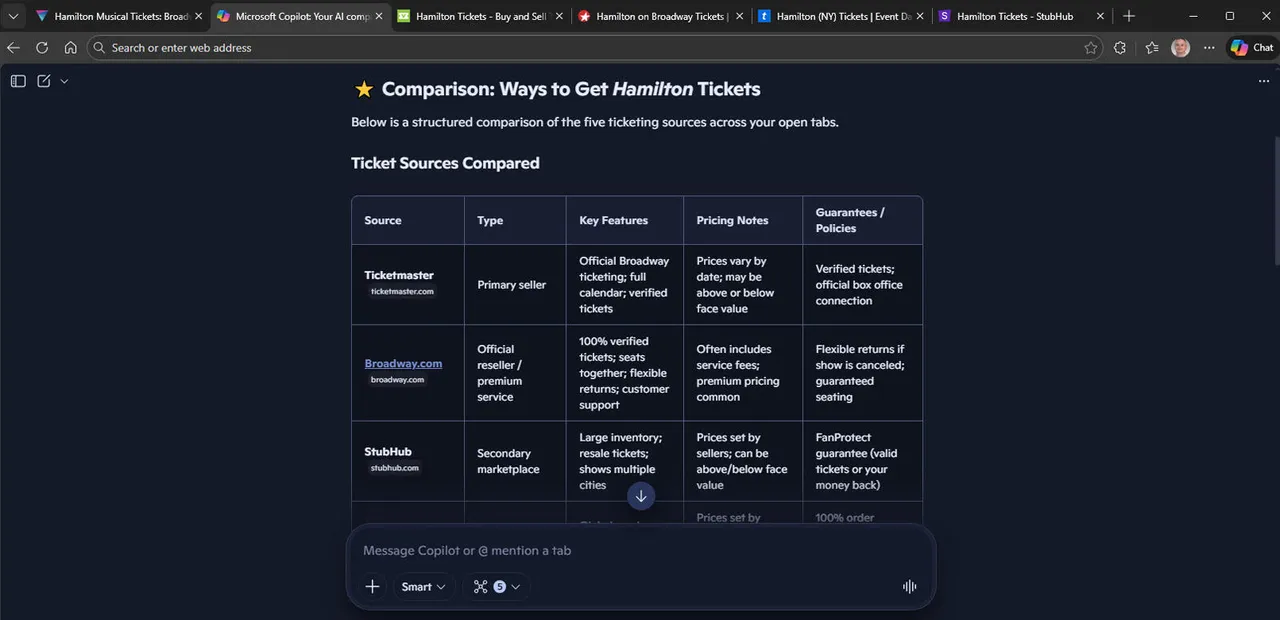
According to PC World, this relatively new Copilot mode can process the content of two or more tabs. Users simply need to open the relevant webpages and input a command, and the browser will generate a comprehensive summary, condensing details from multiple pages.
In practical application, for example, if a user is planning a trip to Birmingham, UK, they can open restaurant review pages in different tabs. Edge's AI feature will organize this information, presenting the restaurants recommended in each review and the options commonly mentioned in a clearer format. This approach avoids the tediousness of browsing pages one by one, saving a significant amount of time.
To enable this feature, users need to turn on Copilot mode in Edge's settings. Specific steps include: clicking the ellipsis icon in the top-right corner to access settings, selecting "AI innovations," and then toggling on the "Turn on Copilot mode" switch. Ensure that Copilot mode, Copilot new tab page, and the "Focus on new tab page" option are all enabled.
Afterwards, users can open a new tab page and close the previous ones, browsing the webpages needed for research. For instance, search for restaurants in Birmingham, UK, and open multiple review links in new tabs. After closing the search results tab, input a command in the Copilot prompt on the new tab page, such as "Compare the open tabs and summarize the reviews, give me the best restaurants in Birmingham."
Edge's AI feature will quickly compare and summarize the information, providing a list of restaurant recommendations. This is not only applicable to travel planning but can also be used for comparing product reviews or analyzing articles, making it a practical research tool.